Esports Logo Maker
- 4.8
- Rating
- 10.00M
- Installs
- Free
- Price
 Analysis by App-foxy
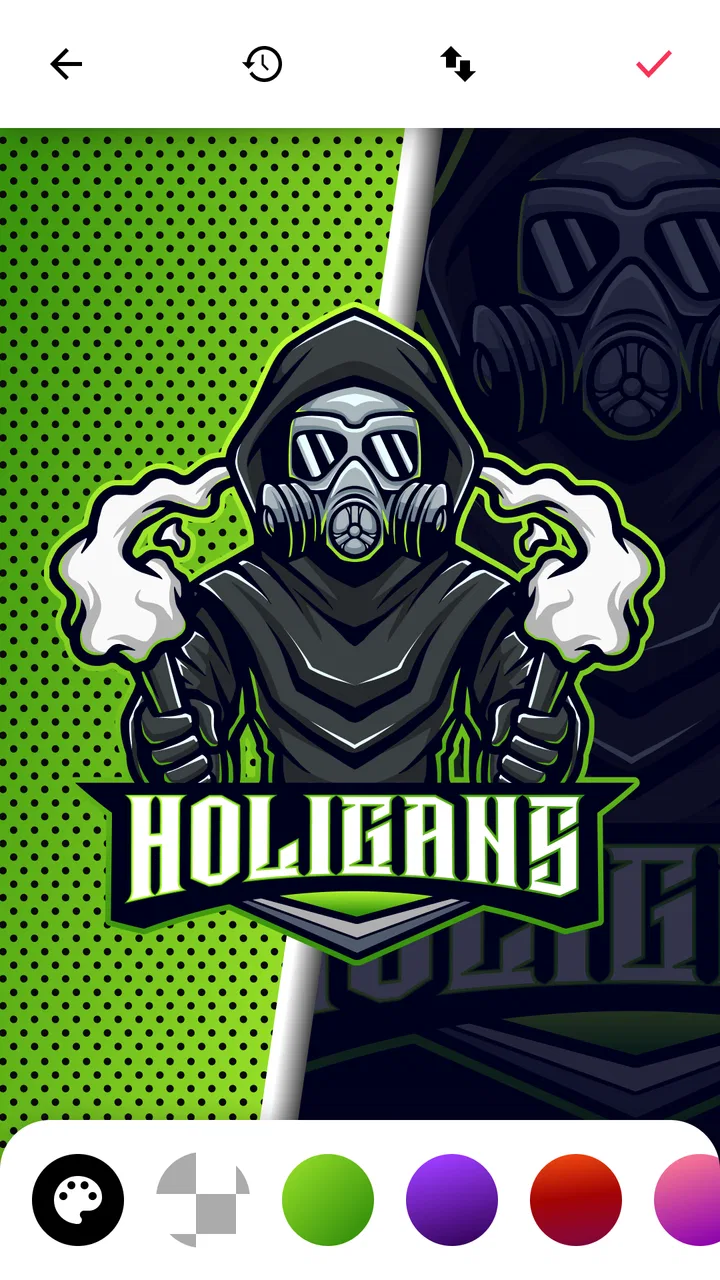
When I need a quick visual identity for a gaming group, I do not always want to open a full desktop design suite, learn a complicated interface, or spend an evening building a logo from an empty canvas. Esports Logo Maker is aimed at that exact moment: making a recognizable gaming emblem on a phone without turning the task into a design course. I found it most useful when I already had a rough idea—an animal, a mood, a color direction, or a team name—and wanted to turn that idea into something presentable quickly.
This is a free art and design app from ZipoApps, rated 4.8 on average from around 335 thousand ratings, with more than 10 million installs. Those figures suggest that it has reached a broad audience, but popularity alone is not the reason I would recommend it. Its real appeal is the focused workflow. Instead of behaving like a general drawing application, it concentrates on the visual language of gaming teams: mascots, avatars, bold lettering, and compact symbols that can work as a profile image.
I would describe it as a practical starting point rather than a complete branding studio. It can help a new clan, streamer, amateur tournament team, or gaming community get an identity onto a social profile quickly. It is less convincing for someone who needs a carefully researched brand system, a highly original illustration, or precise control over every curve and spacing decision.
You May Also Like

 Pandora - Music & Podcasts
Pandora’s Music Is Easy to Start, but Harder to Recover
Pandora’s strength is its low-effort path from a seed to a station. Its weak spot is how much confidence it asks you to place in connection, setup, and quiet recovery.

 8 Ball Pool
 Is Built on Rivalries, Rematches, and Routine
A close look at the rivalries, rematches, shared routines, and unanswered safety questions that turn a quick pool match into a persistent mobile community.

 Samsung Music
’s Quiet Strength Is Playing What You Already Own
Its reach comes less from spectacle than from dependable access to a personal library. That simplicity is both the app’s strongest retention engine and its ceiling.

 AccuWeather: Weather Radar
AccuWeather Review: A Quick, Clear Forecast for Everyday Decisions
For everyday plans, the best forecast is the one you can understand quickly. AccuWeather makes rain timing, radar, and local conditions easy to act on, with a few trade-offs.

 Hill Climb Racing
Why Hill Climb Racing Still Turns Crashes Into One More Run
A tiny car, a bumpy hill and one more upgrade: Hill Climb Racing keeps resurfacing because its simple chaos makes every near-miss feel personal.

 AliExpress - Shopping App
AliExpress Makes Global Shopping Feel Personal, but Shoppers Bear the Risk
AliExpress turns a global marketplace into a pocket-sized discovery engine. Its reach is useful, its shopping loop compelling, and its trade-offs easy to miss.
More From Our News Desk
View All News


How I would decide whether it fits
I’d judge the fit by starting with where the emblem will actually appear and how long I expect to use it: a temporary team avatar calls for a different level of polish than a mark that will represent a group for years. I’d also decide whether I want a guided starting point or the freedom to build every detail myself. That distinction makes it easier to weigh the app’s quick workflow against the upkeep a lasting identity may need.
The right question is speed versus control
The first decision is not whether the app can produce attractive images. It can. The more useful question is how much control I need over the result. If my goal is to make a strong-looking emblem in a short session, the template-led approach makes sense. If I want to draw a mascot from scratch, construct a custom wordmark, or prepare a complete identity with rules for print, merchandise, and multiple layouts, I would look at a more advanced alternative.
For a casual user, the starting point is reassuring. The app is free to download, carries an Everyone content rating, and runs on Android from version 8.0 onward. Its current version is 1.4.6. That combination makes it approachable for people who are not using a recent flagship phone or who simply want to experiment before committing money or time.
I also pay attention to the kind of decision the app encourages. A mascot can make a team feel memorable, but the first attractive character is not necessarily the best long-term choice. I recommend choosing the symbol based on where the logo will appear most often. A detailed face may look impressive on a large screen yet collapse into a muddy shape when used as a tiny avatar. A simpler silhouette with a short name often survives resizing better.
My first-session workflow
When I use an app like this, I try not to judge the first template too quickly. I begin by deciding on three things: the personality of the team, the main viewing size, and the amount of text the logo really needs. A competitive group may want a sharp, aggressive look; a friendly community may benefit from a more playful mascot. That choice limits the number of designs worth considering and prevents endless scrolling through similar options.
After selecting a direction, I would test the design at a small size before spending time polishing it. This is one of the most useful habits with mobile logo makers. I look for whether the eyes, outline, initials, and main color remain readable when the image is reduced. If the identity depends on tiny decorative details, I simplify early rather than trying to rescue the design at the end.
Another practical tip is to make several versions that differ in only one major element. For example, I might keep the mascot and lettering fixed while trying a light background, a dark background, and a high-contrast color treatment. Comparing controlled variations is more useful than changing everything at once. It also makes it easier to identify which part of the design is actually working.
What makes the app approachable
The focused subject matter is its biggest usability advantage. A general drawing app can offer more tools, but it can also leave a beginner staring at a blank canvas. Here, the expected outcome is clearer from the beginning: a gaming-oriented logo with a mascot or avatar feel. That focus reduces the number of decisions I have to make before seeing something recognizable.
I would especially recommend it to someone starting a small gaming group who needs a profile image tonight, not a complete visual identity next month. It can also suit a streamer testing different channel directions, a player creating a temporary team for an event, or a community administrator who wants a consistent emblem for chat groups and social accounts.
The app is also a reasonable low-risk way to discover what kind of visual identity I prefer. Before hiring a designer, I could use it to compare a wolf-like attitude with a robotic one, or a bold initial-based mark with a character-centered emblem. Even if the final professional logo is made elsewhere, this kind of experiment can make the creative brief much clearer.
Where this product wins
Its strongest advantage is the distance between idea and result. I do not need to understand layers, vector paths, or typography theory to create a starting point. The mascot-and-avatar direction gives the design an immediate gaming context, which is more useful than a generic collection of business logo templates when the audience is a team or gaming community.
The app also wins when consistency matters more than originality. A person managing several small teams may want each one to have a recognizable emblem without designing every illustration personally. A focused maker can provide a repeatable process: choose a character direction, adjust the visual treatment, add the identifying text, and compare versions. That is not the same as building a unique identity from first principles, but it is efficient.
I like the fact that the result can be evaluated visually while the idea is still flexible. Instead of discussing abstract concepts such as “more energetic” or “more intimidating,” I can create a few concrete directions and see which one feels closest. That is a useful advantage for groups where several people have different opinions and need something tangible to react to.
There is also a psychological benefit. Starting with a prepared visual foundation makes it easier for non-designers to finish a project. Many people abandon logo work because the blank canvas feels demanding. A guided app reduces that initial resistance, and finishing a decent first version is often more valuable than endlessly planning a perfect one.
Three details that improve the result
First, I would keep the team name shorter than my instinct suggests. Long names compete with the mascot and become difficult to read in a circular profile image. If the full name is important, I would consider using a compact abbreviation in the logo and keeping the complete name in the surrounding profile or bio. This preserves recognition without forcing every word into a small graphic.
Second, I would design for contrast before decoration. A logo can look polished inside the editor because the preview is large and clean, but the real test is a busy social feed or a dark gaming interface. I would check whether the main outline separates from both light and dark backgrounds. If it does not, adding more detail will not solve the basic visibility problem; a stronger outline or simpler color relationship will.
Third, I would keep a neutral version of the design. A vivid color combination may be perfect for a team profile, but a logo often gets reused in places with different backgrounds. A version that remains understandable without relying on one bright effect is more flexible. This is a small workflow decision, yet it can prevent the need to redesign the identity when the team creates a banner, thumbnail, or announcement graphic later.
Where alternatives may fit better
The usual alternatives fall into several groups, and each one solves a different problem. General-purpose design apps are better when I need posters, social graphics, layered compositions, or a logo combined with other content. They usually require more decisions, but that extra freedom matters when the project is not limited to a single gaming emblem.
Drawing and illustration tools are a better match when originality is the priority. If I already know how to sketch or want a mascot based on a specific character concept, a blank canvas gives me more room than a template-driven maker. The trade-off is time and skill. I would not choose that route for a quick team launch unless I was comfortable creating the artwork myself.
Professional vector software is the stronger choice for a serious brand system. It is designed for precise shapes, scalable artwork, carefully controlled typography, and files that can move between digital and physical uses. I would choose it for paid client work, merchandise preparation, or a team expecting to use the mark for years. The learning curve is much steeper, so it is not automatically better for a person who only needs a profile icon.
Online logo generators may be convenient for users who prefer working in a browser or want broader business-oriented categories. However, the gaming focus here is an advantage when I specifically want a mascot or avatar feel. A general business generator may produce a cleaner corporate mark, but it may not capture the bold character-driven look that gaming communities often expect.
There is one important exception: if the team already has a strong visual concept, Esports Logo Maker may feel restrictive. A designer who knows the exact animal pose, custom lettering, or unusual composition they want might spend more time trying to adapt a prepared direction than drawing the idea directly. In that situation, more freedom is worth the added complexity.
Limitations I noticed in the decision
The same focus that makes the app easy to approach can narrow the creative range. A mascot-based result can be effective, but it can also make different teams feel visually similar if users choose familiar character styles and bold treatments without adding a distinctive idea. I would treat the app as a tool for shaping a recognizable direction, not as a guarantee of uniqueness.
Another limitation is the difference between looking good in a preview and functioning as a real identity. A logo needs to work beside usernames, inside small circles, against changing backgrounds, and sometimes in monochrome situations. A mobile maker can help me produce an attractive image, but it does not replace the judgment required to test that image in all the places where a team will use it.
The free entry point is helpful, although the app includes in-app purchases ranging from $0.99 to $149.99 per item. That is a wide range, so I would pay attention to the choices presented during use and decide whether the free workflow is enough before buying anything. For a temporary team, a casual avatar, or an experiment, I would be cautious about paying for extras that do not improve the actual use case.
I would also avoid treating the app as a substitute for professional design when the logo represents a business or a serious esports organization. A quick template-based identity may be perfectly suitable for a community project, but a public brand needs more than visual impact. It needs distinctiveness, consistency, and confidence that the design will remain useful across different sizes and materials.
The cost of switching later
One reason to start with this app is that it lowers the cost of making an initial decision. I can create a visual direction, show it to teammates, and learn what people respond to before investing in a custom project. That is valuable when the team is still changing its name, roster, or personality.
However, I would avoid building too much around an early logo before deciding whether it is temporary. If the emblem becomes part of usernames, banners, tournament graphics, and merchandise, replacing it later may create confusion. My practical approach would be to label the first version as a trial internally and keep the visual system simple enough that a future designer can understand the intended colors, mascot idea, and lettering direction.
There is also a cost to staying with a limited tool for too long. Once a community needs multiple layouts, alternate marks, print-ready artwork, or a carefully refined wordmark, recreating the identity in a professional tool may require extra work. The initial convenience is real, but it should be balanced against how permanent the logo is expected to become.
For that reason, I see the app as especially strong at the beginning of a project. It helps answer, “What should our team look like?” It is less suited to answering, “How do we manage every future version of this brand?” Knowing that distinction makes the choice much easier.
Who should use it and who should skip it
I would recommend it to new gaming teams, casual clans, streamers testing a concept, community organizers, and anyone who wants a mascot-style profile image without learning advanced design software. It is also useful for people who work better by comparing visual examples than by describing an idea in words.
I would be more cautious if I needed a completely original illustration, exact control over typography, professional print production, or a full identity package. In those cases, an illustration app, a vector editor, or a designer would be a better long-term choice. The app can still help with inspiration, but I would not make it the final production tool by default.
It is also not the best fit for someone who dislikes template-led creativity. If the joy of design comes from drawing every element personally, the guided approach may feel limiting rather than helpful. The right audience is not “everyone who needs a logo”; it is people who value a fast, approachable route to a gaming-themed result.
My recommendation after using it
My recommendation is to try Esports Logo Maker when speed, simplicity, and a mascot-led gaming style matter more than complete creative control. The free price makes experimentation easy, the Everyone rating keeps it approachable, and support for Android 8.0 or later gives it a practical reach. Its 4.8 average rating from around 335 thousand ratings and more than 10 million installs also show that it has become a familiar choice for this kind of quick visual project.
I would begin with a clear use case rather than browsing aimlessly. Decide whether the logo is mainly for a tiny profile avatar, a team announcement, or a broader identity. Then make a few restrained variations, test them at small size, and ask whether the name remains readable without the mascot overpowering it. Those steps make the app much more effective than simply choosing the most dramatic-looking option.
My final view is positive but specific. This is a convenient art and design app for turning a gaming idea into a usable first logo, and ZipoApps has kept the purpose clear enough for beginners to make progress quickly. It is not the tool I would choose for a carefully engineered professional brand, but it is a sensible first stop for a team that needs a visual identity now and wants to learn what direction feels right before moving to a more advanced alternative.
FAQs for Esports Logo Maker
01What features does Esports Logo Maker offer?
Esports Logo Maker provides a wide range of customizable templates designed specifically for gaming and esports teams. Users can choose from various fonts, colors, and graphics to create unique logos. The app also offers editing tools to adjust shapes and sizes, ensuring that each logo perfectly represents the team’s identity.
02Is Esports Logo Maker user-friendly for beginners?
Yes, Esports Logo Maker is designed to be intuitive and user-friendly, making it suitable for beginners. The app features a simple interface with easy-to-follow instructions. It includes drag-and-drop functionality and a step-by-step guide to help users create professional-quality logos without needing design experience.
03Can I use the logos created in Esports Logo Maker for commercial purposes?
Logos created with Esports Logo Maker can generally be used for personal and commercial purposes. However, it’s important to review the app’s terms and conditions to ensure compliance with any licensing agreements. This ensures that users are legally protected when using their logos for branding or merchandise.
04Does Esports Logo Maker require an internet connection?
While some features of Esports Logo Maker may be accessible offline, an internet connection is typically required for downloading additional templates and graphics. This connectivity also allows users to save their designs to the cloud or share them directly on social media platforms for broader reach and engagement.
05Are there any in-app purchases in Esports Logo Maker?
Esports Logo Maker offers a free version with basic features, but there are also in-app purchases available. These can include premium templates, advanced editing tools, and the removal of ads. Users should be aware of these options to decide if the premium features are worth the investment for their specific needs.
Pros
- Easy-to-use interface for quick logo creation.
- Wide variety of templates to choose from.
- High-quality export options for professional use.
- Customizable elements for unique designs.
- Regular updates with new design features.
Cons
- Limited free options without a subscription.
- Occasional ads can interrupt the design flow.
- Some features require in-app purchases.
- Advanced editing tools can be hard to find.
- No option for collaborative design work.

Esports Logo Maker
Gallery